
Bar Type for NinjaTrader 8
Smooth Percent Bars
Percentage-based bar structure for NinjaTrader 8.
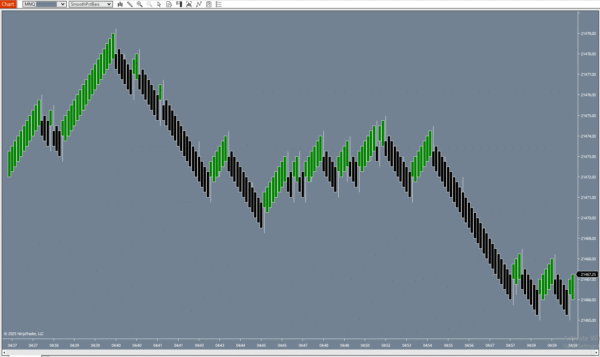
Uniform spacing. Consistent rhythm. No time distortion.
Standard time-based bars print on a fixed schedule regardless of price activity. Smooth Percent Bars print only after price has moved a defined percentage — giving you uniform bar spacing, a chart that reflects actual price movement, and a foundation better suited for automated strategy testing and optimization.
Fully functional trial — no credit card required — instant download
✔ One-Time Purchase ✔ Instant Download ✔ NT8 Compatible ✔ Direct Developer Support
Already decided?
One-time payment · Lifetime access · No subscription
0.25%
Default Move Threshold
Uniform
Bar Spacing
Any
Indicator Compatible
Config
Adjustable Per Instrument
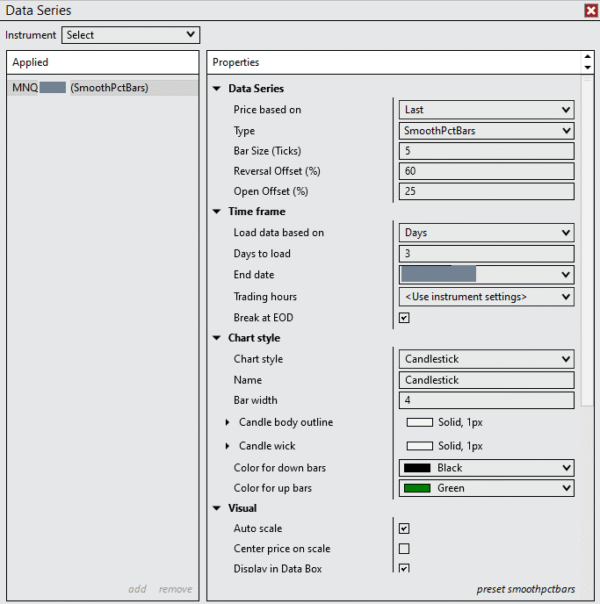
How to add Smooth Percent Bars to your chart: Smooth Percent Bars is a bar type, not an indicator. To use it, right-click your NT8 chart → Data Series → change the bar type dropdown to SmoothPctBars. Do not look for it in the Indicators menu — it will not appear there.
The Problem with Time-Based Bars
- A 1-minute bar during the open can represent 20 points of movement or 0.5 points — both are treated identically
- Low-volatility periods produce crowded, nearly identical bars that distort pattern recognition
- High-volatility periods produce oversized bars that make setups look different than they actually are
- Backtests run on time bars can produce different results at different times of day — not because the strategy is inconsistent, but because the bar structure is
- Optimization on time-bar data optimizes for time-of-day artifacts as much as for actual strategy logic
Smooth Percent Bars removes time from the equation. Every bar represents the same amount of price movement.
How It Works
The Percentage Move Rule
One parameter. Consistent bars. Reliable test results.
Standard Time Bars
Prints on a fixed time schedule
A new bar prints every N minutes regardless of how much price moved. During slow periods this creates many near-identical bars with almost no range. During fast periods one bar can contain enormous moves. The bar count is consistent; the price content is not.
Smooth Percent Bars
Prints after price moves a defined percentage
A new bar prints only after price has moved a configured percentage from the current bar’s open. The default threshold is 0.25%. This means every completed bar in your chart represents roughly the same amount of price activity — making bar-to-bar comparisons valid and backtest results more reliable.
Why it matters for strategy testing: When every bar represents the same price movement, your optimizer isn’t rewarding strategies that happen to do well during the lunch-hour slowdown. It’s finding parameters that work across consistent market conditions.
What Changes
Three Benefits That Show Up Right Away
Uniform Visual Rhythm
Every bar in the chart represents a consistent percentage move. Patterns look the same at 9:35 AM as they do at 2:30 PM — because the bars contain the same amount of price information, not the same amount of time.
Reduced Low-Volatility Noise
During slow periods, fewer bars form because price isn’t moving enough to complete them. This naturally filters the visual clutter that plagues time charts during lunchtime or pre-open sessions — without any manual filtering needed.
More Reliable Backtests
Strategy optimization on percentage-based bars produces results that generalize better to live trading. The bar structure doesn’t favor any time of day — so optimized parameters reflect genuine market logic rather than time-of-day artifacts.
Recommended Use
Who Benefits Most From Smooth Percent Bars
Best suited for systematic traders, strategy developers, and anyone who spends time backtesting and optimizing.
Automated Strategy Developers
If you’re building or refining NinjaScript strategies in the Strategy Analyzer, percentage-based bars eliminate one major variable from your test environment. Walk-forward results on Smooth Percent Bars tend to be more stable because the bar structure doesn’t change character across different times of day or market sessions.
Parameter Optimization Users
Optimizing indicator parameters (moving average periods, RSI lookback, etc.) on time bars means your optimizer is partly fitting to time-of-day volatility patterns. On Smooth Percent Bars, optimized values are based purely on price-based bar structure — improving out-of-sample generalization.
Pattern Recognition Traders
Visual traders who rely on chart patterns — flags, wedges, consolidations, breakouts — benefit from bar types where every bar carries consistent information. Pattern shapes look the same across different instruments and session types on Smooth Percent Bars because the scale is always percentage-normalized.
Configuration
One Parameter to Set
The move percentage is the only required setting. Defaults work for most active futures instruments.
Move Percentage
Default: 0.25%
How much price must move (as a % of the current bar’s open) before a new bar prints. Increase for fewer, larger bars. Decrease for more, smaller bars.
Typical Range
0.10% – 0.50%
Most ES and NQ traders find values in this range produce useful bar counts during active sessions without excessive thinning during slow periods.
Tuning Tip
Watch a full session first
Load the trial, apply it to your instrument with the default, then observe bar formation during the open, midday, and close. Adjust the percentage until bars form at a rate that matches your trading style.
Comparison
Smooth Percent Bars vs Other Bar Types
FAQ
Common Questions
How do I add Smooth Percent Bars to my chart?
Right-click your chart → Data Series → change the bar type dropdown to SmoothPctBars. It is not available through the Indicators menu — it is a bar type and must be applied at the Data Series level.
What percentage should I use?
The default is 0.25%, which works well for most active futures like ES and NQ. Start there and watch bar formation during a full session. If bars are forming too quickly, increase the value. If too slowly, decrease it. Most traders land somewhere between 0.10% and 0.50% depending on their instrument and trading timeframe.
Will my existing indicators work on Smooth Percent Bars?
Yes. Smooth Percent Bars is a fully native NT8 bar type. Any indicator or automated strategy that works on standard bars will run on Smooth Percent Bars without modification.
How is this different from volume or tick bars?
Tick bars print after N number of trades. Volume bars print after N contracts traded. Both are activity-based but neither normalizes for price level. Smooth Percent Bars normalize for price — meaning a 0.25% move on ES at 4000 and ES at 5000 generates the same bar, even though the tick equivalent is different.
Is this better for backtesting than time bars?
For many strategy types, yes. Time bars create inconsistency across different sessions because the same bar width contains very different amounts of price activity at different times of day. Smooth Percent Bars give the optimizer a consistent unit to work with — which tends to produce parameters that generalize better to live conditions.
What instruments does this work with?
Any instrument available in NinjaTrader 8 — futures, equities, forex, and crypto. Because the trigger is percentage-based, it scales automatically with price level. A 0.25% move on a $5,000 index behaves the same as a 0.25% move on a $500 instrument in terms of bar formation rate.
What’s in the 7-day trial?
Fully functional — no feature restrictions. After 7 days the bar type deactivates unless you purchase a license. This gives you time to evaluate it on your own charts and run some backtests before deciding.
Try It First
Download the 7-Day Free Trial
Fully functional. No restrictions. No credit card required. Apply it to your chart, run it through a session, backtest a strategy — then decide.
Fully functional trial | No credit card required | Instant download
✔ One-Time Purchase ✔ Instant Download ✔ NT8 Compatible ✔ Direct Developer Support
Tried it and ready to get the full license?
One-time payment · Lifetime access · No subscription
Additional Resources
NinjaTrader 8 only | Applied via Data Series, not Indicators menu | Windows PC