
NinjaTrader 8 Indicators & Bar Types
Try Every Tool Free for 7 Days
Download any indicator or bar type, import it into NinjaTrader 8, and activate your fully functional 7-day trial — no payment required, no feature restrictions.
After your trial, purchase a one-time lifetime license or let it expire — your choice.
5
Premium Indicators
2
Custom Bar Types
7
Day Free Trial
NT8
Native Platform
Available Tools
Browse Individual Product Pages
No Risk
Fully Functional Trial
Every feature of the paid version is available during the trial. No limitations, no degraded functionality — the full tool for 7 days.
Flexible
Fully Customizable
Every parameter is adjustable. Match the tool to your market, timeframe, and trading approach — not the other way around.
No Subscription
One-Time License
If you choose to purchase after your trial, it’s a single one-time payment. No recurring charges, no annual renewals. Lifetime access with free updates.
Built for NT8
Native Performance
Every tool is written in NinjaScript C# and runs natively inside NinjaTrader 8. No wrappers, no bridges, no third-party dependencies.
Step 1
Download Your Tool
Click the download link for the tool you want to try. Do not unzip the file — NinjaTrader imports directly from the .zip format.
Indicators
-
Turning Points Indicator
AI-powered reversal detection — 24 K-parameter systems -
NSL Trade Exit Manager
Automated trade exit rules and risk control -
NSL Market Depth Order Flow
Visualize real-time order flow and depth of market -
NSL Dynamic Session Levels
Key session high/low/open levels drawn automatically -
NSL Opening Range Breakout
Opening range detection with breakout signal alerts
Custom Bar Types
-
MeanRenko
Noise-filtered Renko bars — recommended for the Turning Points Indicator -
Smooth Pct Bars
Percentage-based bar construction for smoother chart structure
Note: Do not unzip downloaded files. NinjaTrader imports directly from .zip format. Unzipping the file before import will cause the installation to fail.
Steps 2 – 5
Install and Activate Your Trial
The full process takes under 5 minutes. Follow the steps below.
Import into NinjaTrader 8
- Open NinjaTrader 8
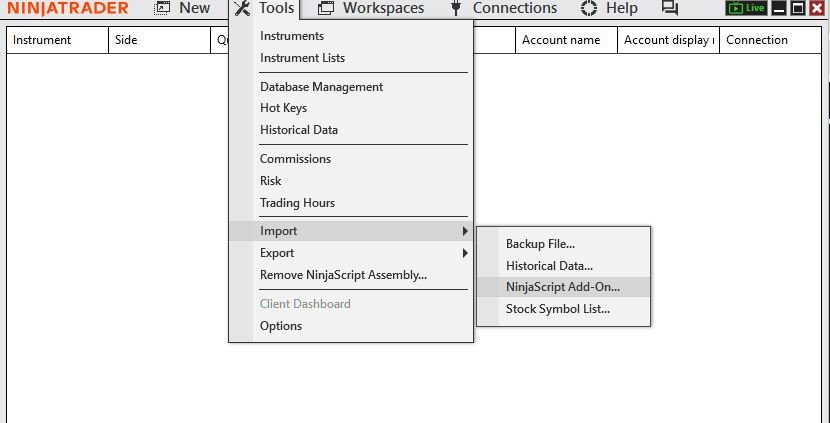
- Go to Tools → Import → NinjaScript Add-On…
- Select the downloaded .zip file and click Open
- Wait for the Import successful confirmation message
- Restart NinjaTrader 8 (recommended before use)
Add the Tool to Your Chart
- Open or create a chart in NinjaTrader 8
- For indicators: Right-click the chart → Indicators… → find and select your tool
- For bar types: Right-click the chart → Data Series → select the bar type
- Adjust settings to match your preferences, then click OK
Request Your Trial License
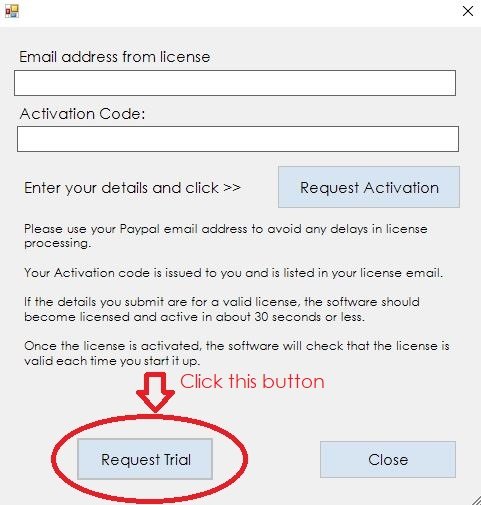
- When the tool loads, a license prompt will appear — click Request a Trial
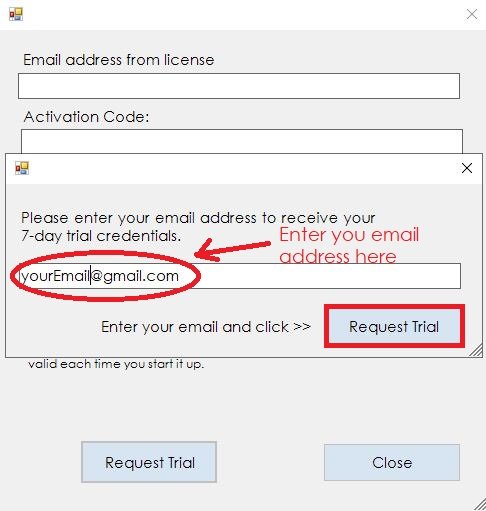
- Enter your email address to receive your activation code
- Check your inbox — also check your spam/junk folder if it doesn’t arrive within a few minutes
Activate Your 7-Day Trial
- Copy the activation code from your email
- Paste your email address and activation code into the fields shown in the prompt
- Click Activate — your 7-day trial starts immediately
- All features are fully available from the moment of activation
Need Help?
Having trouble with installation or activation?
Send us a message and we’ll help you get set up. Most issues are resolved within one reply.
Why Us
Built by Traders. Refined Over 10+ Years.
NT8 Native
Every tool runs natively in NinjaTrader 8. No third-party wrappers or external dependencies.
Fast Setup
From download to activated trial in under 5 minutes. Clear steps, no technical knowledge required.
Updated
Tools are actively maintained and updated. Purchases include all future upgrades at no extra cost.
Supported
Email support included with every purchase. Real answers from the people who built the tools.