
Bar Type for NinjaTrader 8
MeanRenko Bars
Noise-filtered bar structure for NinjaTrader 8.
Cleaner charts. More reliable signals. Less false triggers.
Standard Renko bars react to every tick. MeanRenko bars only print when price moves meaningfully beyond the prior bar’s midpoint — filtering the noise that generates false signals on standard charts and making your indicators work the way they were designed to.
Fully functional trial — no credit card required — instant download
✔ One-Time Purchase ✔ Instant Download ✔ NT8 Compatible ✔ Direct Developer Support
Already decided?
One-time payment · Lifetime access · No subscription
See It In Action
One Printing Rule — Cleaner Charts, Better Signals
The MeanRenko printing rule, live chart structure, and how to apply it via Data Series
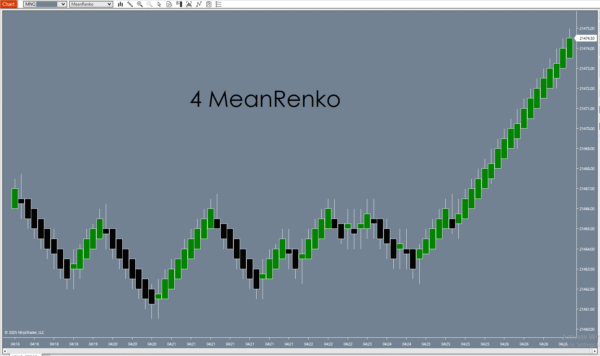
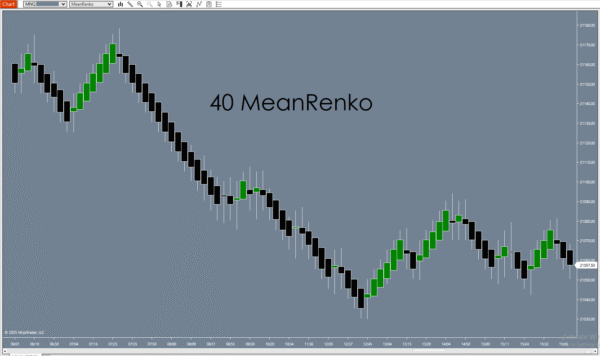
Mid
Point-Based Trigger
Less
False Signals
Any
Indicator Compatible
Auto
Adjusts Per Instrument
How to add MeanRenko to your chart: MeanRenko is a bar type, not an indicator. To use it, right-click your NT8 chart → Data Series → change the bar type dropdown to MeanRenko. Do not look for it in the Indicators menu — it will not appear there.
The Problem with Standard Renko Bars
- Standard Renko bars print the moment price moves by any fixed amount — including insignificant fluctuations
- This creates excessive small bars during consolidation that distort indicator readings
- RSI and EMA calculations on noise-filled data produce unreliable signals
- Trend structure looks choppy and hard to read even in clearly trending conditions
- False signals increase because the bar structure reacts to every tick, not meaningful moves
MeanRenko filters this noise at the bar level — before your indicators even calculate.
How It Works
The MeanRenko Printing Rule
One simple rule that changes everything about your chart structure.
Standard Renko
Prints when price moves ≥ box size
A new bar prints the moment price moves a fixed number of ticks in any direction — regardless of whether that move is meaningful or just noise. Results in excessive small bars, choppy structure, and indicator readings skewed by tick-level activity.
MeanRenko
Prints when price moves beyond the prior bar’s midpoint
A new bar prints only when price moves far enough beyond the midpoint of the current bar to be considered a meaningful continuation. Small oscillations within the current bar’s range do not trigger a new bar — they are absorbed.
Why it matters: Your RSI, EMA, and momentum indicators calculate on bar closes. When the bar structure is cleaner, every indicator that runs on top of it becomes more reliable — without changing a single indicator setting.
What Changes
Three Things That Improve Immediately
Switch your chart to MeanRenko and these differences show up right away.
Trend Clarity
Noise-filtered bars make uptrends and downtrends visually obvious. Consolidation areas become compact and distinct from directional moves — instead of appearing the same as trending conditions.
Indicator Reliability
RSI, EMA, MACD, and any other indicator you apply calculates on cleaner closes. Fewer meaningless bars in the dataset means indicator readings reflect actual price movement — not tick noise.
Setup Readability
Trade setups are easier to evaluate at a glance. Support and resistance levels are cleaner. Entry and exit points are less ambiguous. Less time spent second-guessing whether a signal is real or noise.
Recommended Use
Who Uses MeanRenko Bars
Works for discretionary traders and automated strategy developers alike.
Turning Points Indicator Users
MeanRenko is the recommended bar type for the Turning Points Indicator System. The 24-system consensus reversal logic was designed and tested on MeanRenko structure. Using standard time bars generates more signals — including more false ones. MeanRenko is included with every Turning Points purchase.
Strategy Testers and Optimizers
Cleaner bar structure means your strategy backtests are not inflated by noise-driven entries. When you optimize on MeanRenko data, the results reflect genuine market conditions — not artifacts of time-based bar construction.
Discretionary Futures Traders
ES, NQ, CL, GC, and other high-volume futures instruments produce clean MeanRenko structure during active sessions. If you currently trade Renko and find yourself filtering too many setups manually, MeanRenko does that filtering automatically at the bar level.
Comparison
MeanRenko vs Standard Bar Types
FAQ
Common Questions
How do I add MeanRenko to my chart?
Right-click your chart → Data Series → change the bar type dropdown to MeanRenko. It is not available through the Indicators menu — it is a bar type and must be applied at the Data Series level.
What instruments work best with MeanRenko?
Any instrument with sufficient volume — ES, NQ, YM, RTY, CL, GC, major forex pairs. High-volume futures produce the cleanest MeanRenko structure during active sessions. Thin or low-volume instruments may produce irregular bar sizes.
Will my existing indicators work on MeanRenko bars?
Yes. MeanRenko is a fully native NT8 bar type. Any indicator or automated strategy that works on standard bars will run on MeanRenko without modification.
How is MeanRenko different from standard Renko?
Standard Renko prints a new bar when price moves a fixed tick amount in any direction. MeanRenko prints only when price moves beyond the midpoint of the current bar — a stricter condition that filters out minor fluctuations and produces fewer, more meaningful bars.
Can I use MeanRenko with automated strategies?
Yes. MeanRenko works with any NinjaScript strategy that can run on custom bar types. The bar series is available to strategies in the same way as time, tick, or volume bars.
Is this the same MeanRenko included with the Turning Points Indicator?
Yes. If you purchased the Turning Points Indicator, MeanRenko is already included in your download. This listing is for traders who want MeanRenko as a standalone bar type without the full Turning Points system.
What’s in the 7-day trial?
Fully functional — no feature restrictions. After 7 days the bar type deactivates unless you purchase a license. This gives you time to evaluate it on your own charts and instruments before deciding.
Try It First
Download the 7-Day Free Trial
Fully functional. No restrictions. No credit card required. Add it to your chart and see how the bar structure changes — then decide.
Fully functional trial | No credit card required | Instant download
✔ One-Time Purchase ✔ Instant Download ✔ NT8 Compatible ✔ Direct Developer Support
Tried it and ready to get the full license?
One-time payment · Lifetime access · No subscription
Additional Resources
NinjaTrader 8 only | Applied via Data Series, not Indicators menu | Windows PC