
NinjaTrader 8 — Full C# Source Code
NSL TrendCross Blueprint
A working automated strategy — and the chassis
you build every strategy after it on.
2,400 lines of commented C#. No DLL, no license check, no obfuscation. The entry signal is about 40 lines of it. The other 2,360 are the bracket order engine, break-even, auto-trail, daily cut-off, Chart Trader buttons, live settings window and draggable info panel — the parts that take weeks to get right.
GET THE SOURCE — $197
▶ WATCH THE 42s DEMO
One-time payment — instant download — yours permanently
✔ Complete unlocked source ✔ No expiry, no activation ✔ One free modification included ✔ Direct developer support
Building for clients?
The Developer License lets you ship it inside unlimited client projects — $497
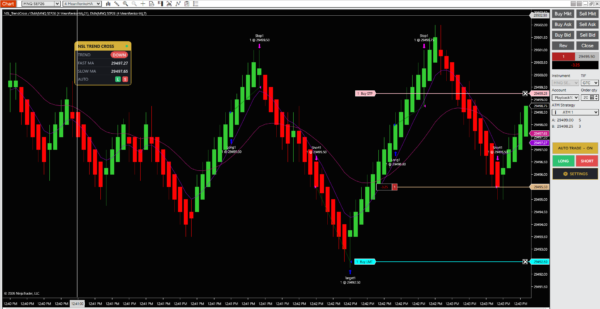
The strategy running live — Chart Trader buttons, info panel, and the MA cross entries
2,400
Lines of Commented C#
9
Marked Edit Zones
12
Moving Average Types
0
DLLs or Locked Files
Walkthrough
Watch It Trade, Then Watch the Settings Change Mid-Position
42 seconds on MNQ. Entries, targets and exits printing live, the draggable info panel, the Chart Trader buttons — then the settings window opens and break-even and auto-trail are switched on without disabling the strategy.
MNQ SEP26 — 4-tick MeanRenko Heikin Ashi bars, NinjaTrader Playback
Why Most NinjaScript Projects Stall
- The signal takes an afternoon. The order management takes a month.
SetStopLoss()works until a partial fill, a rejection, or a disconnect — then you have an orphaned stop and a live position- Sample code on the forums covers entries. Almost none of it covers what happens when an order comes back Rejected
- Chart Trader buttons, SharpDX panels, and WinForms settings windows each have their own undocumented traps
- Paid strategies ship as locked DLLs — you can run them, you can’t learn from them or change them
The Blueprint hands you the finished plumbing and gets out of the way.
Read this before you buy
A moving-average cross is a well-known, widely-published entry method. It is not a secret and it is not an edge. On its own, it whipsaws in ranging markets like every MA cross ever written.
What you are buying is the chassis, not the signal. You are buying the 2,360 lines around the signal — a tested order engine, risk modules and a working UI — so that when you drop in an idea you actually believe in, it runs properly from day one.
No backtest results are published on this page, and no return figures are claimed anywhere in this product. Any strategy’s results depend entirely on the instrument, the settings, the market conditions and the signal you put in it. Test everything on simulation first.
The Difference
You Never Have to Guess Where to Edit
Every place you are meant to change is marked with a banner, explained in plain English, and given working examples. Search the file for EDIT ZONE to jump between them.
// >>> EDIT ZONE 1 - THE SIGNAL. THIS IS WHERE YOU START. ================
//
//     These two booleans are the entire entry logic. Everything below
//     this block reads them and nothing else. Replace them with your own
//     rule and the whole chassis keeps working unchanged.
//
//     The contract is simple:
//         IsCrossAbove == true   ->  the strategy wants to be LONG
//         IsCrossBelow == true   ->  the strategy wants to be SHORT
//
//     EXAMPLE A - RSI reversal instead of an MA cross:
//         bool IsCrossAbove = RSI(14,3)[idx] < 30 && RSI(14,3)[idx+1] >= 30;
//         bool IsCrossBelow = RSI(14,3)[idx] > 70 && RSI(14,3)[idx+1] <= 70;
// ======================================================================
What’s Already Built
The Parts You’d Otherwise Spend a Month On
Real Order Object Tracking
Every entry, stop and target is a live Order tracked through OnOrderUpdate and OnExecutionUpdate — not SetStopLoss(). That is what survives partial fills, rejections and reconnects without orphaning a working order.
Exit & Reverse State Machine
An opposite signal while in a trade cancels every working order, flattens at market, waits until the account is genuinely flat and all orders are settled, then enters the other way. The waiting part is where most implementations break.
Break-Even & Auto-Trail
Break-even at a tick trigger with an adjustable offset. Auto-trail with its own profit trigger, distance and step frequency. Both call ChangeOrder so the broker-side stop stays in sync.
Daily Cut-Off
Daily profit target and max loss measured on realised plus unrealised P&L, with a clean reset at session close. The starting point for prop-firm rule enforcement.
Chart Trader Buttons
ON/OFF, LONG-only, SHORT-only and SETTINGS buttons injected into the Chart Trader panel, with correct dispatcher handling and clean teardown on State.Terminated. Copy this region into any strategy you write.
Live Settings Window
A floating WinForms panel that changes target, stop, quantity and trail settings without disabling the strategy — something the standard properties dialog cannot do while you hold a position.
Draggable SharpDX Info Panel
An on-chart status card showing position, trend, MA values and P&L. Rendered with SharpDX so it stays smooth on a loaded chart, and draggable with the mouse-hook pattern already wired up.
Flexible Entry Types
Market, Limit or Stop-Market entries with a tick offset and automatic cancel after N bars if unfilled. 12 moving-average types behind a single factory method you extend with one line.
Who Buys This
Three People Get Their Money’s Worth
The trader with an idea and no chassis
You know the setup you want to automate. You do not want to spend the next six weekends learning why your stop went missing after a partial fill. Drop your rule into Edit Zone 1 and you are running by the weekend.
The NinjaScript developer taking client work
Every client wants brackets, break-even, a trail and buttons. You rebuild it every time. With the Developer License this becomes your starting template for every project — it pays for itself on the first job.
The C# programmer learning NinjaScript
You can write C#. NinjaTrader’s state model, dispatcher rules and SharpDX lifecycle are the parts the documentation glosses over. This is a complete, working, commented reference implementation of all three.
Included With Every Purchase
One Free Custom Modification
Buy the Blueprint and tell me the one change you want. I write it into your copy and send it back — no extra charge. Most requests are done within 3–5 business days.
Typical requests I cover
- Swap the MA cross for your indicator
- Add a higher-timeframe trend filter
- ATR-based stop and target
- An extra input or panel row
- Time-window or session tweaks
How it works
- Buy and download
- Email your one request within 30 days
- I confirm scope before starting
- You get the modified file back
Fair-use note: one modification of roughly a half-day’s work, redeemable within 30 days of purchase. Larger builds — multi-instrument, portfolio logic, full custom strategies — are quoted separately, and Blueprint owners get 20% off that work.
Licensing
Two Licenses. Pick by What You’ll Do With It.
Personal Source License
one time
- Complete unlocked C# source
- Use on your own trading accounts, unlimited machines
- Modify it however you like
- One free custom modification
- Email support on the code
- Not for resale or client delivery
Developer License
one time
- Everything in the Personal License
- Ship it inside unlimited client projects
- Sell compiled strategies built on it under your own name
- Two free custom modifications
- Priority email support
- Reselling the source itself is still not permitted
In plain terms: the file is yours forever, with no activation, no expiry and no server check. Both licenses let you change anything. The only thing neither license permits is redistributing the source itself — publishing it, sharing it, or reselling it as source. Build whatever you want on top of it.
What It Doesn’t Do Yet
The Honest Gap List
Every one of these is a good candidate for your free modification — and they are documented so you can build them yourself.
Fixed-tick stops only
Target, stop and trail are in ticks. An ATR-based version adapts to volatility and is a ~20-line change in Edit Zone 6.
No higher-timeframe filter
Single series only. Edit Zone 4 documents exactly how to add one and Zone 1 shows how to gate the signal with it.
One target, no scale-out
A single bracket per entry. Partial exits at two or three targets need a second order pair in the core engine.
Fixed quantity
No risk-percent position sizing. Size is whatever you set. Account-risk sizing is a common first modification request.
Currency cut-off, not trade count
Daily P&L limits are in place. Max trades per day, max consecutive losses, and a cooldown after a stop-out are not.
One trading window
A single start/stop time or 24/7. Multiple sessions and news blackout windows are not built in.
No external alerts
Nothing sends email, Discord or webhook notifications on a fill. Straightforward to add, not currently present.
No CSV trade log
Results live in the Strategy Analyzer only. There is no per-trade file export for your own analysis.
FAQ
Common Questions
Is this profitable?
I make no profitability claim, and you should be sceptical of anyone selling code who does. A moving-average cross is a public, well-studied method with well-known weaknesses in ranging markets. What you are paying for is a correct, tested execution chassis so that whatever signal you eventually trust runs properly. Test on simulation before risking capital.
How much C# do I need to know?
To run it as-is: none. To change the signal: enough to write an if-statement. Edit Zone 1 is two boolean variables with three worked examples you can copy and adapt. To rewrite the order engine: a lot — which is exactly why you do not have to.
Is anything locked, obfuscated, or time-limited?
No. One plain .cs file. No DLL, no license check, no activation server, no expiry date, no phone-home code. Open it in Notepad and read every line before you compile it. That is the whole point of the product.
Which instruments does it work on?
Anything NinjaTrader 8 can trade — futures, forex, stocks. Stops and targets are set in ticks, so the numbers change per instrument but the code does not. Defaults are set for a typical index future; adjust them in Edit Zone 3 for what you trade.
Can I use this in a prop firm evaluation?
The daily profit target and max loss cut-off give you a foundation, but prop firm rules vary and often include a trailing drawdown the strategy does not track. Check your firm’s automation policy first — many restrict or ban fully automated trading. This is a common paid modification.
What does the free modification actually cover?
One change of roughly a half-day’s work, requested within 30 days. Swapping the signal, adding a filter, an ATR stop, an extra input, a panel row — all comfortably inside it. I confirm the scope in writing before I start, so there is never a surprise. Bigger builds get a quote, with 20% off for owners.
Do I get updates?
Yes — any fix or improvement I make to the base file goes out to every owner by email, free, permanently. Since your copy is source you control, you decide whether to merge a change or stay on your own version.
Refunds?
Source code cannot be returned once downloaded, so there is no refund after download — which is why this page tells you plainly what the code does and does not do before you buy. If it will not compile on a supported NinjaTrader 8 installation, I will fix it or refund you in full.
Get the Source
Stop Rebuilding the Plumbing
2,400 lines of commented, unlocked C#. Nine marked edit zones. One free modification. Yours permanently.
Instant download · No activation · No expiry · Free updates for life
Risk disclosure: Futures, forex and options trading carries substantial risk of loss and is not suitable for every investor. Automated strategies can and do lose money, and can fail in ways manual trading does not — including during platform outages, connection loss and fast markets. No performance results are claimed or implied for this product. Past performance does not guarantee future results. Nothing on this page is financial advice. Test on simulation and never trade capital you cannot afford to lose.
Additional Resources
NinjaTrader 8 required | Windows PC | No third-party dependencies